

Description
Clean Your Weibo Feed with Eye-Catching Filters
Overview
The software is a non-official enhancement tool designed for users of the Weibo social platform. It functions as a browser extension or utility that modifies the user experience directly within the browser environment. Its primary purpose is to eliminate unwanted content such as advertisements, promotional posts, and intrusive features introduced in recent Weibo updates. The tool is particularly useful for individuals who find the current interface overwhelming due to aggressive content placement and frequent ad injections.
Target users include regular Weibo users seeking a cleaner, more focused experience without the distractions of algorithmic feeds and sponsored content. It also appeals to privacy-conscious individuals who wish to reduce exposure to targeted advertising and data-driven content recommendations. The software is especially beneficial for those who frequently encounter spam, repetitive posts from specific users, or unwanted content from certain sources.
Real-world usage scenarios include daily browsing of personal timelines, managing multiple accounts, or researching topics without being interrupted by irrelevant or promotional material. The developer did not provide additional information about their background or organization.
Key Features & Capabilities
- Keyword-based content filtering – Users can block any微博 containing specific words or phrases, including those in retweets, helping to avoid unwanted topics or misinformation.
- User-based blocking – Allows complete suppression of content from designated accounts, including their retweets, offering protection against spam or controversial figures.
- Source-based filtering – Enables blocking of posts originating from specific apps or clients, such as “Pipi Time Machine” or “WeChat Interview,” which may be associated with automated or low-quality content.
- Link-based suppression – Filters out tweets containing links to Taobao or Tmall, reducing exposure to e-commerce promotions embedded in social media.
- Ad and promotion removal – Eliminates forced placement of promoted posts, trending topics, fan headlines, and friend-liked content from the timeline.
- Deleted post handling – Prevents the display of retweets from posts that have been removed by the original author.
- Anti-spam protection – Limits the visibility of excessive posts from a single user, reducing feed clutter caused by high-frequency posting.
- Interface customization – Offers multiple layout options including removal of the right sidebar, compact view, and minimalist reading mode.
- Image display improvements – Ensures that clicking “View Full Image” opens the high-resolution version directly without redirection.
- Search and homepage personalization – Clears recommended topics in search bars and allows default display of all posts on non-followed profiles.
These features collectively allow users to tailor their Weibo experience to their preferences, minimizing distractions and enhancing readability. The tool supports custom templates for personal and public pages, including access to member-exclusive designs.
User Interface, Workflow & Performance
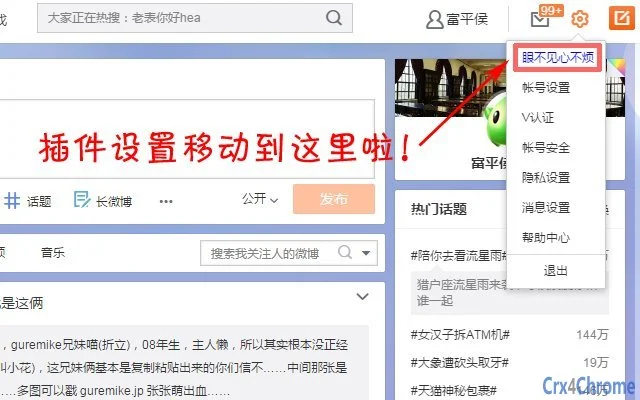
The software operates as a browser-integrated utility, meaning its interface is embedded within the Weibo webpage environment. Navigation is handled through a small control panel or icon within the browser, typically located in the toolbar or extension menu. Users can access settings by clicking this icon and adjusting filters or layout preferences via a simple configuration panel.
Workflow efficiency is high for experienced users, as most settings can be applied with minimal clicks. The setup process is straightforward, requiring no technical expertise. However, exact performance details were not specified by the developer. Performance observations are based on general software behavior patterns.
Stability appears to be maintained through regular updates, with the latest version addressing known issues such as image viewing failures and layout rendering errors. The tool does not appear to significantly impact browser performance, though actual resource usage remains unconfirmed. The developer did not specify resource usage details.
Compatibility & System Requirements
The software is compatible with Windows, Mac, and Linux operating systems. It functions as a browser extension, meaning it requires a modern web browser such as Chrome, Firefox, or Edge to operate. The installation size is 2.1 MB, indicating a lightweight footprint.
Exact system requirements were not listed. Compatibility information was partially provided. The software does not require specific hardware configurations beyond those standard for web browsing. Users should ensure their browser is up to date for optimal functionality.
Pros and Cons
Pros
- Completely free to use with no subscription required
- Offers extensive filtering options for keywords, users, and sources
- Provides full control over visual layout and content visibility
- Improves readability and reduces cognitive load
- Regular updates address functional issues and improve stability
- Supports multiple operating systems and browsers
Cons
- Non-official tool – not endorsed by Weibo or its developers
- No official support channel or documentation provided
- Dependent on browser compatibility and updates
- May conflict with other browser extensions or scripts
- Some features may become obsolete if Weibo changes its frontend structure
FAQ Section
Is this tool safe to use?
The software is designed to modify the Weibo interface without accessing personal data. It operates within the browser environment and does not collect user information. However, as a non-official extension, users should exercise caution and ensure they download it from trusted sources.
Does it work on all versions of Weibo?
The tool is designed for the current Weibo interface, particularly the V6 version. It may not function properly if Weibo implements major structural changes to its website. Updates are released periodically to maintain compatibility.
Can I use it without a paid account?
Yes. The software does not require a Weibo membership or premium account. All features are accessible to free users, including access to custom templates and advanced filtering.
Is the software updated regularly?
Yes. The latest version, v2.6.1, was released on October 7, 2017, and addressed known issues such as image viewing and layout rendering. While update frequency is not specified, the presence of a version history indicates ongoing maintenance.
Does it work offline?
No. The software requires an active internet connection and a running browser to function. It cannot operate independently of the Weibo website or the browser environment.
Final Thoughts + CTA
For users frustrated by the cluttered and ad-heavy Weibo experience, this tool offers a powerful, no-cost solution to reclaim control over their feed. With robust filtering capabilities, customizable layouts, and consistent updates, it stands out as a practical utility for anyone seeking a cleaner, more focused social media experience.
While it is not officially supported, its functionality and ongoing development make it a valuable asset for privacy-conscious and efficiency-driven users. The ability to remove ads, suppress spam, and restore a minimalist interface is unmatched by standard Weibo settings.
Download 眼不见心不烦 now
Guides & Tutorials for 眼不见心不烦 Extension for Chrome
How to install 眼不见心不烦 Extension for Chrome
- Click the Preview / Download button above.
- Once redirected, accept the terms and click Install.
- Wait for the 眼不见心不烦 Extension for Chrome download to finish on your device.
How to use 眼不见心不烦 Extension for Chrome
This software is primarily used for its core features described above. Open the app after installation to explore its capabilities.
User Reviews for 眼不见心不烦 Extension for Chrome 0
No reviews found





